
Wavy Cables
Wavy Cables
An online store for a custom audio-cable maker on Angular 21 with SSR: catalogue, cart, Stripe-backed checkout, Product rich-result data and a guided custom-cable quote builder covering 840 combinations.
- Angular 21
- Angular SSR
- NgRx
- Angular Material
- Tailwind CSS
- TypeScript
- Stripe
- WebSockets
- reCAPTCHA v3
- Google Maps
- JSON-LD
- Express
Architecture
Overview
Wavy Cables makes custom audio cables. Its online store sells standard cables through a normal cart and checkout. Customers who want something made to order use a guided builder that turns their choices into a quote request.
The first store, started in December 2024, was a client-side Angular 17 app. I rewrote it with a new design on Angular 21 with server-side rendering, and the rewrite is the version that runs the live site. It uses the same Angular workspace template as Khan Meat Pointe and AA Bridal Studio: a public site, an admin app and a shared library. Payments go through Stripe, created on the server.
The challenge
Custom products are hard to sell online. A custom cable combines a type, a colour, a length and two connector ends. Even with today's option lists, that is 840 combinations. The business prices custom work by hand, so the builder has to:
- make the choice easy
- refuse an incomplete spec
- give staff a clear, unambiguous spec
- do all of this without calculating a price
Product pages also need price, availability and rating data in the server-rendered HTML for rich results.
What I built
Storefront
- Categories, product pages, cart and checkout.
- Shipping and billing forms with a "same as shipping" option, coupon validation and reCAPTCHA v3.
- Checkout posts the order to the API. The Stripe payment is created on the server, and the browser opens the payment URL the API returns. The Angular app has no card fields and does not use Stripe.js, so card details never pass through it.
- An order that is packed but not yet paid shows a "Pay Now" button on its order page, which asks the API to start the payment again.
- Order-detail links that contain a token, so a customer can view an order without signing in.
- Reviews, a profile with orders and custom orders, and legal pages.
Custom-cable quote builder
Customers choose five options and see a live colour preview. The builder writes a readable spec into the message field, which the customer can still edit, and it blocks the request until every option is chosen. Staff then review the request under "Custom orders". For now, the option lists are kept in the component rather than loaded from the API.
Admin app
Products, categories, orders, custom orders, order batches, discounts and customers, all on role-guarded routes.
Tech & architecture
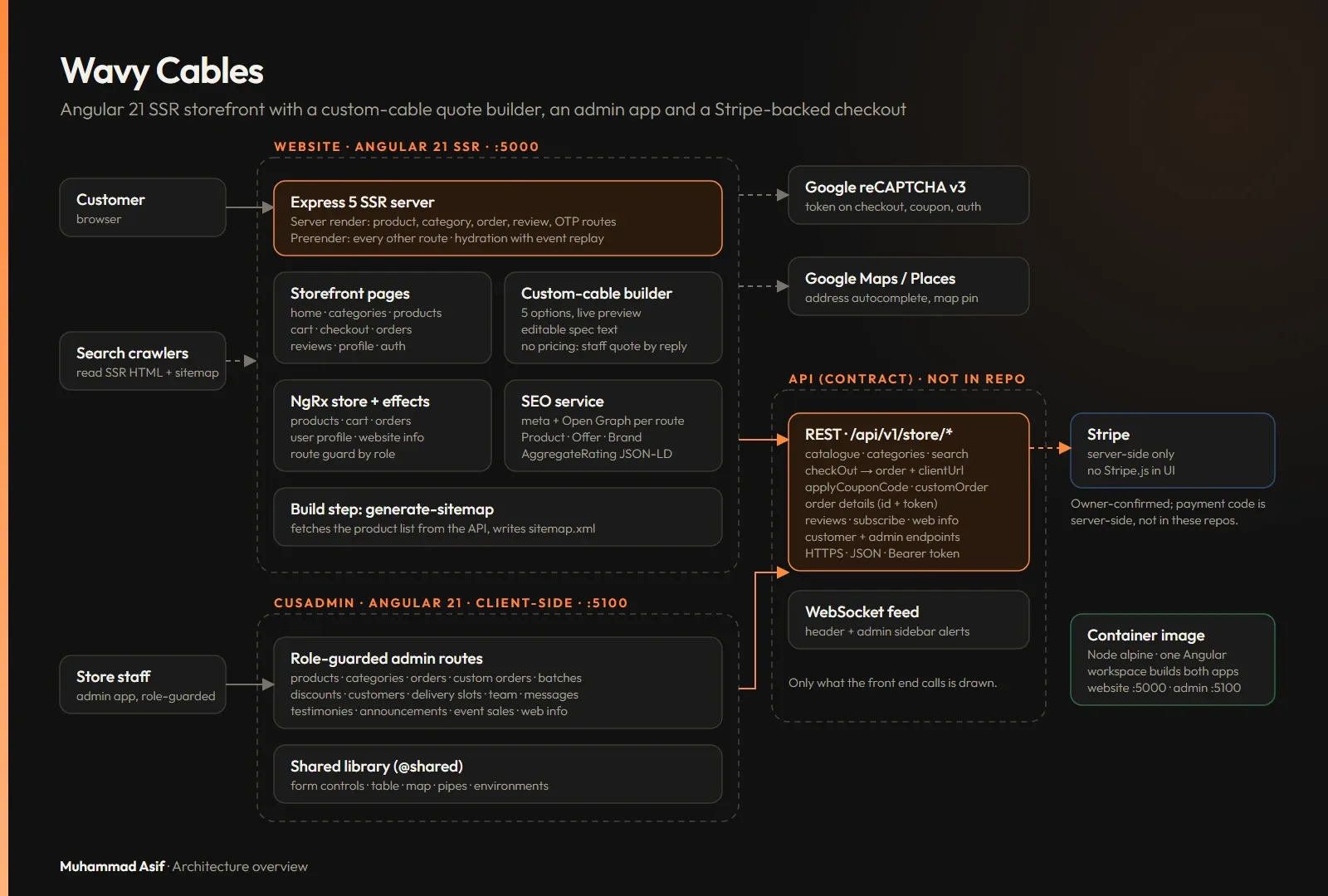
- Angular 21 with Angular SSR on an Express 5 server. Product, category and order pages render on the server, and everything else is prerendered.
- NgRx for the catalogue, cart and orders.
- Angular Material and Tailwind CSS 3.4.
- reCAPTCHA v3 and Google Maps.
- Stripe for payments, handled by the backend API. The front end only follows the payment URL it returns.
- A WebSocket notification service in both the storefront and the admin app.
- Product, Offer, Brand and AggregateRating JSON-LD, plus a sitemap generated at build time.
Architecture
- The Express 5 SSR server renders product, category and order pages per request. All other pages are prerendered, and hydration replays early user events.
- NgRx effects load the catalogue. Product pages output Product JSON-LD with price, availability and rating.
- The cart lives in NgRx. Checkout collects shipping and billing details, validates coupons and gets a reCAPTCHA v3 token.
- Checkout posts to the API, which creates the Stripe payment on the server. If the response contains a payment URL, the browser goes there. If not, it opens the order details.
- On the order page, a packed order that is not yet paid has a "Pay Now" button. It asks the API to start the payment and opens the URL that comes back.
- Customers can open an order through a link that contains a token.
- The custom-cable builder sends a structured spec as a custom-order request, and admins review it.
- Before each production build, a script fetches the product list and writes
sitemap.xml.
Hard problems
A custom product without a pricing engine
The selected options are a typed record. Each choice updates the preview and rewrites the spec text, and the request can only be sent once all five options are set. Contact details are filled in from the signed-in profile. Staff receive a clear spec and reply with a price.
// Quote builder: choices -> structured spec, no pricing (simplified)
type OptionKey = 'type' | 'color' | 'length' | 'endA' | 'endB';
selected: Record<OptionKey, string> = { type: '', color: '', length: '', endA: '', endB: '' };

select(key: OptionKey, value: string) {
  this.selected[key] = value;
  this.form.controls.message.setValue(this.specText());   // customer can still edit it
}
get complete() { return Object.values(this.selected).every(Boolean); }
specText() {
  const lines = Object.entries(this.selected).map(([k, v]) => LABELS[k as OptionKey] + ': ' + (v || 'Not selected'));
  return ['Custom cable request:', ...lines, 'Please contact me with pricing and availability.'].join('\n');
}
submit() { if (!this.complete) return this.toast.error('Choose all five options'); /* POST request */ }
Product SEO on an SSR storefront
Rich results need live data, such as price, stock and rating, in the HTML that crawlers fetch. So product and category routes render on the server, and an SEO service builds the structured data from the loaded product. The sitemap is generated from the API before each build, so new products appear without anyone editing a file.
// Product rich-result data from the loaded product (simplified)
productJsonLd(p: Product) {
  return {
    '@context': 'https://schema.org', '@type': 'Product',
    name: p.name, image: p.images.map(abs), description: p.summary,
    brand: { '@type': 'Brand', name: BRAND },
    offers: {
      '@type': 'Offer', priceCurrency: CURRENCY, price: p.price, url: abs('/products/details/' + p.slug),
      availability: p.stock > 0 ? 'https://schema.org/InStock' : 'https://schema.org/OutOfStock',
    },
    ...(p.reviewCount
      ? { aggregateRating: { '@type': 'AggregateRating', ratingValue: p.rating, reviewCount: p.reviewCount } }
      : {}),
  };
}
Results in numbers
Counted in the Angular 21 code that runs the live site:
- 3 Angular projects: the storefront, the admin app and a shared library.
- 30 storefront routes and 44 admin routes.
- 5 routes with parameters rendered on the server. Everything else is prerendered.
- 122 components.
- 52 NgRx effects.
- 840 custom-cable combinations: 5 types, 7 colours, 6 lengths and 2 connector styles at each end.
- 16 reCAPTCHA v3 calls across 13 files.
Outcome
The live store moved from a client-side Angular 17 app to Angular 21 with server rendering. Product pages carry rich-result data, and the sitemap is built from the live catalogue. Custom work arrives as a clear quote request instead of an open-ended message, next to a normal cart and Stripe-backed checkout for standard products.