Student Management System
An institute platform with admin, teacher and student portals in Angular 21 and live face-recognition attendance: the teacher's camera streams frames over WebSockets and matches appear in the lecture view.
- Angular 21
- Angular SSR (prerendering)
- NgRx
- TypeScript
- PrimeNG
- Tailwind CSS
- FullCalendar
- ApexCharts
- Capacitor
- MediaPipe FaceMesh
- WebSockets
Architecture
Overview
The Student Management System (SMS) is an administration platform for an institute. It has separate portals for admins, teachers and students, a marketing landing page, and attendance taken by face recognition in real time.
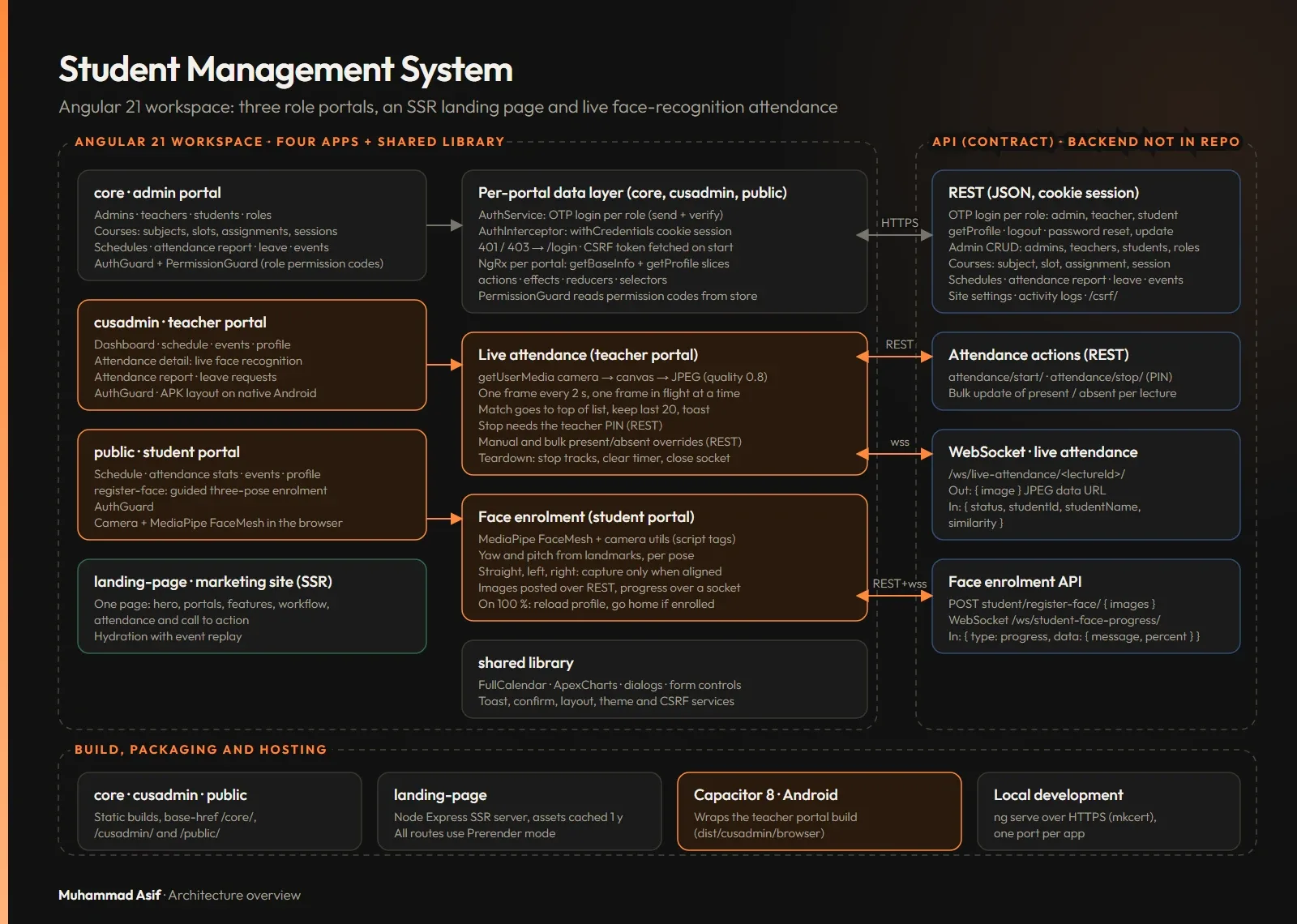
I built the Angular front end, which has five projects in one workspace:
- An admin portal.
- A teacher portal, also packaged as a mobile app with Capacitor.
- A student portal.
- A landing page, prerendered and served by a small Express server.
- A shared library.
Face recognition runs on a separate backend, which is not covered here.
The challenge
Attendance is one of the most repetitive jobs in a classroom. The aim was to take it off the teacher's hands: the camera sends frames to the recognition service, and the lecture view fills in while the class runs, with no roll call and no page refresh. Two things make this hard:
- Recognition takes longer than the gap between frames.
- Students enrol their own faces with no one supervising.
What I built
Three portals and a landing page
- Admin portal: admins, courses (subjects, slots, assignments, course types, sessions), teachers, students, roles, schedules, an attendance report, leave requests, events, activity logs and settings. It has calendar views (FullCalendar) and dashboards (ApexCharts).
- Teacher portal: live attendance for each lecture, available on the web and as a Capacitor app.
- Student portal: includes guided face enrolment.
- Landing page: a single page, prerendered at build time and served by an Express server, with hydration that replays early user events.
Live face-recognition attendance
- The teacher starts attendance. The camera opens first, then the app starts the lecture over REST and connects the WebSocket.
- Every two seconds a compressed frame goes to the backend over a WebSocket.
- Each match appears in the lecture view as it comes back, with a toast.
- Teachers can mark any student present or absent, one at a time or in bulk.
- Stopping a session requires the teacher's PIN.
Guided face enrolment
Students enrol with three poses: straight, left and right. MediaPipe FaceMesh runs in the browser and captures a frame only when the head is in the right position. Upload progress comes back over a second WebSocket.
Tech & architecture
- Angular 21 and TypeScript, with NgRx for state in each portal.
- The landing page is one prerendered page (Angular SSR tooling) served by an Express server. The three portals run in the browser.
- PrimeNG 21 and Tailwind CSS 3.4.
- FullCalendar 6 and ApexCharts.
- Capacitor 8 for the teacher app.
- MediaPipe FaceMesh in the browser for pose checks.
- WebSockets for live attendance and enrolment progress.
Architecture
- Enrolment: in the student portal, the camera feeds MediaPipe FaceMesh. Landmark positions give an estimate of head turn and tilt, and a frame is captured for each of the three poses only when the head is aligned. The images are uploaded, and the backend streams enrolment progress back over a WebSocket.
- Starting attendance: the teacher starts attendance for a scheduled lecture. The camera opens first, then the app calls the REST start endpoint and connects that lecture's WebSocket.
- Sending frames: every two seconds the app draws a video frame to a canvas and sends it as a JPEG. Only one frame is waiting for a reply at any time.
- Matches: the backend replies with the matched student and a similarity score. The lecture view adds the match at the top and keeps the last 20.
- Corrections: teachers can override present or absent through a REST batch update. Stopping needs the teacher's PIN. The camera and socket are released when the tab changes or the view closes.
- Admin work: scheduling, reports and dashboards in the admin portal run over REST.
Hard problems
Streaming camera frames without flooding the socket
Recognition takes longer than one frame interval, so sending every frame would build a queue and make the lecture view lag. So frames are taken on a fixed two-second interval and skipped while the last one is still being processed. Each frame is compressed to JPEG before it is sent, and the list of matches is capped at 20. When the view is destroyed or the tab changes, the app stops the camera tracks, clears the interval and closes the socket, so the device camera never stays on.
// Sampled frame streaming, one frame in flight (simplified)
start() {
  this.timer = setInterval(() => {
    const v = this.video;
    if (!this.connected || this.awaitingReply || v.readyState !== v.HAVE_ENOUGH_DATA) return;
    Object.assign(this.canvas, { width: v.videoWidth, height: v.videoHeight });
    this.canvas.getContext('2d')!.drawImage(v, 0, 0);
    this.awaitingReply = true;
    this.ws.send({ image: this.canvas.toDataURL('image/jpeg', 0.8) });
  }, 2000);
}
onReply(r: Match) {
  this.awaitingReply = false;
  if (r.status) this.detected = [toDetection(r), ...this.detected].slice(0, 20);
}
Pose-checked face enrolment in the browser
Recognition is only as good as the reference images, and students enrol with no one helping them. Uploading bad frames and rejecting them on the server would be slow and frustrating. So FaceMesh runs on the device. Head turn is estimated from where the nose sits between the ears, and tilt from the nose-to-forehead and nose-to-chin distances. Each of the three steps has its own allowed range, and a frame is captured only when the head is inside it.
// Landmark-based head-pose gate (simplified)
estimatePose(lm: Point[]): Pose {
  const nose = lm[NOSE], lEar = lm[LEFT_EAR], rEar = lm[RIGHT_EAR];
  const half = (rEar.x - lEar.x) / 2;
  const yaw = ((nose.x - (lEar.x + half)) / half) * 45;          // approx. degrees
  const up = nose.y - lm[FOREHEAD].y, down = lm[CHIN].y - nose.y;
  const pitch = ((up - down) / (up + down)) * 40;
  return { yaw, pitch };
}

isAligned(p: Pose, step: Step): boolean {
  const w = WINDOWS[step];                                       // straight, left or right
  return p.yaw >= w.yaw[0] && p.yaw <= w.yaw[1] && p.pitch >= w.pitch[0] && p.pitch <= w.pitch[1];
}
Results in numbers
- 5 Angular projects: 3 portals, 1 prerendered landing page and 1 shared library.
- 73 portal route entries: 43 admin, 17 teacher and 13 student.
- 9 NgRx reducers and 9 effects files across the three portals.
- 2 WebSocket streams: live attendance and enrolment progress.
- 128 HTTP calls across the service files.
- 3 guided enrolment poses.
Outcome
Admins, teachers and students each have a portal built for their role. Attendance is taken by the system rather than by hand: matched students appear in the lecture view during the class, and the teacher keeps the final say with manual and bulk overrides.