
ChatMessenger
A multi-tenant team chat front end in Angular 20: a super-admin portal for tenant companies and a per-company chat app on native WebSockets, with presence, typing, read receipts and attachments.
- Angular 20
- TypeScript
- RxJS
- Angular Signals
- PrimeNG
- Tailwind CSS 3.4
- WebSockets
- pdf.js
Architecture
Overview
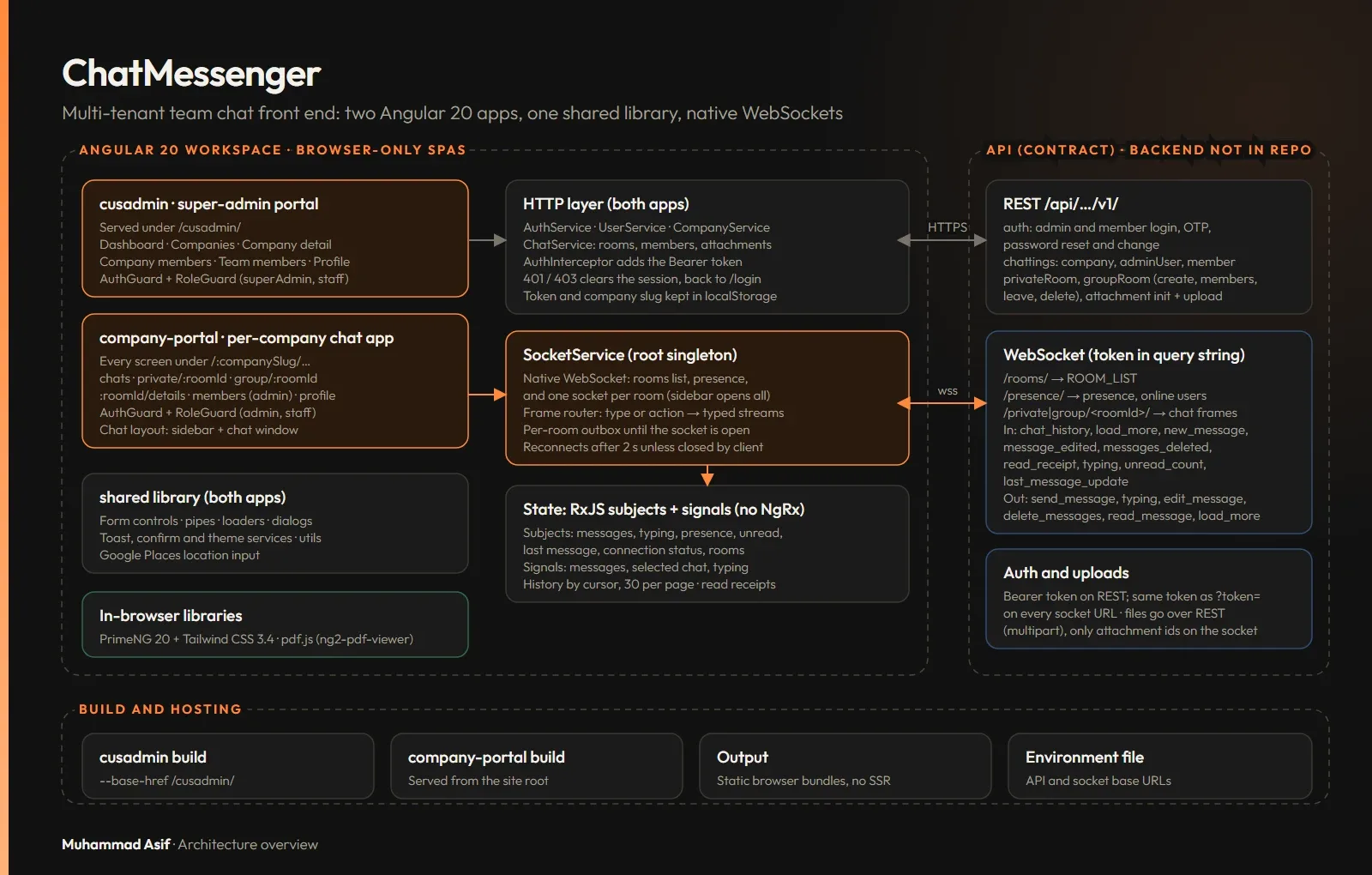
ChatMessenger is a multi-tenant team chat platform. I built the Angular 20 front end, which has two apps and a shared library in one workspace:
- A super-admin portal for managing tenant companies.
- A per-company chat app, with every screen under the company's own URL (
/:companySlug/...).
The backend is a separate service and is not covered here.
The challenge
Chat only feels right when it is instant. The app needs three live channels:
- the list of rooms
- presence (who is online)
- one socket for each chat room, because the sidebar opens a socket for every chat
The server's events do not all use the same shape. Messages must survive a socket that is still connecting, and large files must not block the chat socket.
What I built
- A super-admin portal that manages companies, company members and team members over REST.
- A per-company chat app with private and group rooms.
- Presence, so people can see who is online and when they were last seen.
- Typing indicators, with a debounce timer.
- Read receipts, plus editing and deleting messages.
- History loaded page by page with a cursor, 30 messages at a time.
- File and image attachments, with a PDF viewer for previews.
- Auto-scroll and a "jump to bottom" button.
Tech & architecture
The real-time layer is built directly on native WebSockets, wrapped in one custom SocketService. There is no separate real-time library and no NgRx. State lives in RxJS subjects and Angular signals.
- Angular 20, TypeScript and RxJS. The app runs only in the browser, with no server rendering.
- PrimeNG 20 and Tailwind CSS 3.4 for the UI.
- pdf.js (through ng2-pdf-viewer) for attachment previews.
Architecture
- A user signs in to the company portal over REST. An interceptor attaches the bearer token, and a role guard sends them to
/<company>/chats. - The app opens a rooms-list socket and a presence socket.
- The sidebar opens a socket for every chat room it lists, so unread counts and last messages stay live. Each room socket sends the recent history, and older pages are loaded with a cursor.
- Messages, edits, deletes, typing indicators and read receipts all travel over the room socket. They are merged into a signal-based message list with no duplicate ids.
- For attachments, the app starts an upload session over REST, uploads the files as multipart form data and sends only the returned attachment ids over the socket.
- The super-admin portal manages companies and members over REST.
Hard problems
One real-time layer for many sockets and mixed event shapes
The server's events vary: some use type and some use action, some fields are camelCase and some snake_case, and some events come singly while others are batched. Components should not each parse raw frames. So one root-provided service makes sure it never opens a second socket for the same purpose. It turns every frame into a small set of typed streams tagged with the room id, and it reconnects after two seconds when a connection drops. Components then filter those shared streams by room.
// Turn mixed frame shapes into typed streams (simplified)
private route(frame: any, roomId: string) {
  const kind = frame.type ?? frame.action;
  const id = Number(frame.messageId ?? frame.message_id ?? frame.id);
  switch (kind) {
    case 'new_message':
      return this.messages$.next({ kind, roomId, msg: frame.message ?? frame });
    case 'message_edited':
      return this.messages$.next({ kind: 'edited', roomId, msg: { ...frame.message, id } });
    case 'typing':
      return this.typing$.next({ roomId, userId: Number(frame.userId ?? frame.user_id) });
    case 'presence':
      return this.applyPresence(frame);
  }
}
Never losing a message while a room socket connects
A user can type and press send before the room socket has opened, or while it is reconnecting. So send() holds the message in a queue for that room, and the queue is sent in order as soon as the socket opens. Files never travel over the socket. They are uploaded over REST, and only their ids are sent in the chat message.
// Per-room outbox, sent once the socket opens (simplified)
send(payload: object, roomId: string) {
  const ws = this.rooms.get(roomId);
  if (ws?.readyState === WebSocket.OPEN) return ws.send(JSON.stringify(payload));
  const queue = this.outbox.get(roomId) ?? [];
  queue.push(payload);
  this.outbox.set(roomId, queue);                  // held until the socket opens
}

private onOpen(roomId: string) {
  (this.outbox.get(roomId) ?? []).forEach(p => this.send(p, roomId));
  this.outbox.delete(roomId);
}
// Files: REST upload session -> multipart upload -> send_message with attachment ids
Results in numbers
- 2 apps and 1 shared library in one Angular workspace.
- 24 route entries: 14 in the company portal and 10 in the super-admin portal.
- 3 kinds of WebSocket connection: rooms list, presence, and one for each chat room, all opened by the sidebar.
- 6 client actions and 10 server event types over the socket.
- 50 HTTP calls across the service files: 31 in the company portal and 19 in the super-admin portal.
Outcome
Each tenant company gets its own real-time workspace with the features people expect from a modern chat tool, and the platform owner manages every tenant from one portal. All live traffic goes through one service, so connecting, reconnecting, queueing and parsing are handled in one place.